New client onboarding offer — first month of Managed IT 50% offCode: AZM50 Claim it →
AZ MANAGEDIT
Free Assessment

Managed IT · Cybersecurity · Cloud

Stop
thinking
about
IT.

We run the help desk, the security, the cloud — even your website and marketing — so you can just run the business. One partner for your entire technology stack, across Arizona and beyond.

Straight to an engineerMonth-to-monthNo sales sequence
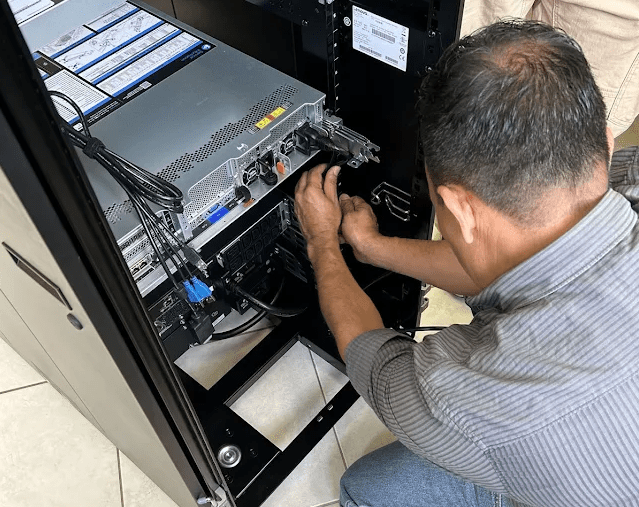
AZ Managed IT engineer servicing a client server rack AZ Managed IT field work
Field support · Arizona
★★★★★
5.0
Arizona businesses
Google reviews
30+
Years in IT
24/7
Monitoring
4
States
 browsing now· this week·peak

Trusted with real businesses and critical systems

San Diego Airport Fort Ord Army White Apple Institute Burbank Airport Gilbane Building Company Southwest Insurance General

/ Start here

What’s making
IT a pain?

You don’t need to know which service you need — just tell us what’s happening.

/ Real outcomes

What changes
after we take over.

Real engagements — the mess we walked into, and the number that came out the other side. Anonymized for client confidentiality.

Managed IT
<1 day
to onboard a new hire
BeforeBreak-fix IT, new hires waiting days, no clear owner.
AfterOnboarding under a day, $340/mo of redundant software cut, owner spends <20 min/mo on IT.
Cloud
$1,840/mo
cloud spend saved
BeforeBallooning Microsoft 365 & Azure bill; ex-staff still had access.
AfterSaved every month, paid for itself in <2 months, access revoked the same day.
Security
34%→6%
phishing click-rate
BeforeStaff clicking phishing links; a breach with unclear scope.
AfterBreach contained to 12 people, no recurrence in 20 months.
Co-Managed
14 gaps
closed in 60 days
BeforeOverloaded internal admin, stalled projects.
AfterProjects finished in-quarter — and the admin took a first vacation in 3 years.
Consulting
$240K
M&A price adjustment
BeforeM&A technology due diligence.
AfterFindings supported the adjustment; retained afterward as virtual CIO.
vCIO
$86K
vendor spend reallocated
BeforeNo IT strategy or budget ownership at board level.
AfterPulled from redundant vendors; IT became a standing board agenda item.

/ What we do

One team.
The whole picture.

From the help desk to the servers underneath it — monitored, secured and documented.

24/7 monitoring, patching, help desk, quarterly reviews.

Managed IT

The day-to-day that keeps everything running — proactive, monitored and documented so problems get caught before you feel them.

What's included

24/7 monitoring & alertingPatch managementHelp desk & remote supportSystem administrationAsset & licence managementStructured quarterly reviews
EDR, incident response, pen testing, HIPAA / SOC 2 support.

Cybersecurity

Layered defense built for real-world threats, with the evidence trail your insurer or auditor will ask for.

What's included

EDR & endpoint protectionIncident responsePenetration testingVulnerability scanningEmail & identity securitySecurity awareness trainingHIPAA / SOC 2 support
Migrations, licence right-sizing, Entra ID, DMARC.

Cloud & M365

Cloud done right — moved cleanly, licensed sensibly, configured so it scales with you instead of surprising you.

What's included

Tenant migrations & cleanupsLicence right-sizingSharePoint & TeamsAzure hostingSPF, DKIM & DMARCEntra ID & identity
UniFi, firewalls, VLAN segmentation, Wi-Fi.

Network

The layer everything else depends on — designed to stay online and segmented so a problem in one place stays there.

What's included

Switching & Wi-Fi (UniFi)Firewalls & VLAN segmentationOn-prem managed servicesSite-to-site VPNsNetwork monitoring & alertingSystem administration
VMware ESXi, Hyper-V, Proxmox — consolidated and recoverable.

Virtualization

Most small businesses run three or four aging servers, each doing one job, each a single point of failure. We consolidate them onto a properly designed virtualization stack — fewer boxes, better performance, cleaner recovery, and one platform your backups and monitoring actually cover.

Turn a rack of aging servers into one platform you can back up, monitor and recover in hours instead of days.

What's included

VMware ESXi & vCenterMicrosoft Hyper-VProxmox & XCP-ngHost consolidation & migrationsSnapshot & retention policiesHigh-availability clustering
Structured cabling, telco, and power — coordinated end to end.

Cabling & Low Voltage

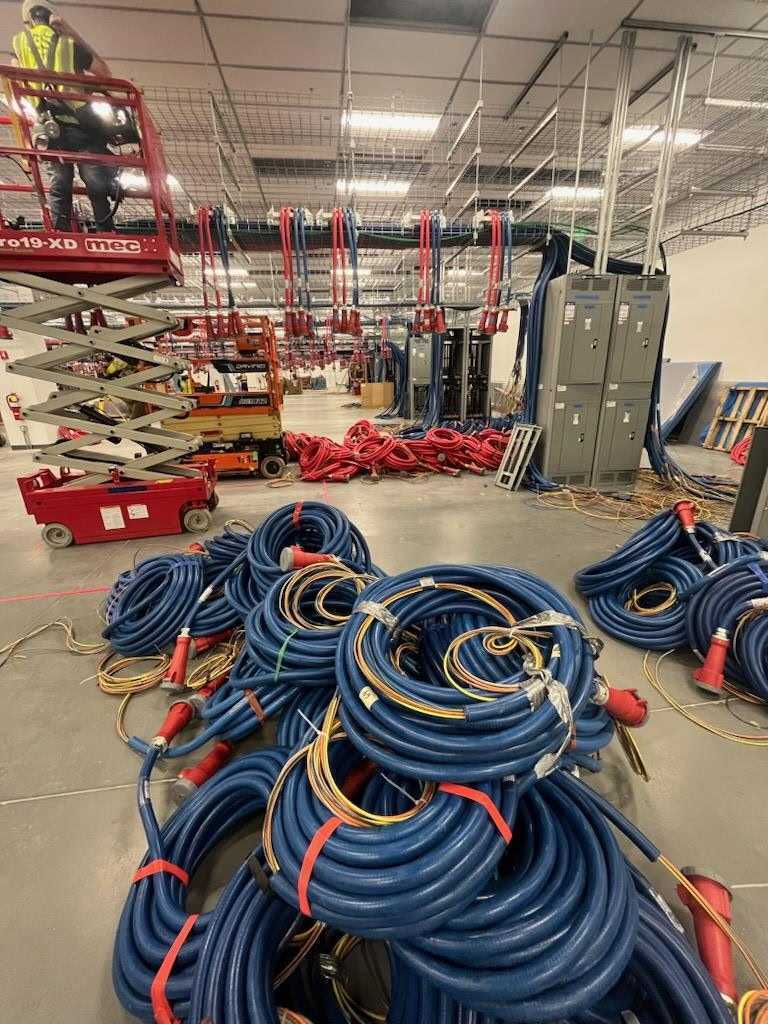
Moving offices, building out a new suite, or fixing a mess of an existing install? We coordinate structured cabling, low-voltage, telco, and clean power through our licensed partner network — so the physical layer is part of the same conversation as the IT plan, not an afterthought.

One project, one point of contact for everything from the wall jack to the rack — instead of chasing three different vendors.

What's included

Cat6 / Cat6A data cablingFiber runs & terminationsServer rack builds & cleanupCamera & access control cablingTelco & demarc extensionsRack power & UPS installs
BCDR, verified restores, ransomware recovery.

Backup & DR

Backups that are actually tested — so when something fails, you are back fast with dates written down, not assumed.

What's included

BCDR & DRaaSVerified test restoresBusiness continuity planningOn-site & offsite copiesMicrosoft 365 backupRansomware recovery
Hosted VoIP & Teams Phone, porting, voicemail-to-email.

VoIP

Business phones that survive the office moving — ported numbers, voicemail to email, and work-from-anywhere done properly.

What's included

Hosted VoIP & Teams PhoneNumber portingAuto-attendant & routingVoicemail to emailSoftphones & mobileCall reporting
Sites designed, built, hosted, and kept current.

Web Design & Hosting

We build sites the right way and then keep them running — not the hand-off-and-disappear model. Custom builds, WordPress, Laravel, managed hosting with monitoring and backups, SSL, updates, and the small copy fixes you never get around to yourself.

A web presence that actually works — built, hosted, patched, and looked after, not launched and abandoned.

What's included

Custom design & rebuildsWordPress & LaravelManaged hosting & SSLUptime monitoring & backupsOngoing content updatesPerformance & Core Web Vitals
Google Business Profile, Google Ads, SEO, and reviews.

SEO & Digital Marketing

Your website only earns its keep when people can find it. We handle the pieces that bring you work — Google Business Profile management, local SEO, Google Ads campaigns with real tracking, and a steady flow of reviews. Reported on monthly, tied to leads, not vanity metrics.

More of the right customers actually finding you — through search, maps, and ads that pay for themselves.

What's included

Local SEO & on-pageGoogle Business Profile managementGoogle Ads (Search & LSA)Review generation & responseConversion tracking & reportingMonthly performance reviews
Line-of-business & legacy apps kept running, patched and secure.

Business Application Support

The software your business actually runs on — from modern line-of-business apps to the legacy system you cannot replace yet. We keep it running, patched, integrated and safe, and map the path forward when the time comes.

What's included

Line-of-business app supportLegacy app maintenanceCompatibility troubleshootingVirtualization of old systemsIntegrations & data flowsMigration & end-of-life planning
Hourly & per-incident IT support — no contract required.

On-Demand / Break-Fix

For businesses that aren't ready for a monthly plan: pay-as-you-go IT support for the problem in front of you — a down server, a migration, a weird issue no one can crack. Same engineers, same standards, just on demand.

What's included

Pay-as-you-go help deskOne-off troubleshootingServer & network fixesVirus & malware removalEmail & Microsoft 365 issuesQuoted before we start
/ How we typically help

Real problems. Real solutions.
Real-world IT.

A look at the challenges we've helped businesses solve — from messy networks and Microsoft 365 migrations to security, backups, servers, and complete IT takeovers.

01 Typical Client Scenario · Small Business

From Break/Fix to Managed IT

The problem

A growing business has accumulated years of one-off fixes. Nobody knows exactly how the network is configured, employees call different vendors for different problems, and IT issues are handled only after something breaks.

Our approach

We inventory the environment, document the network and systems, standardize workstations, review Microsoft 365 and security, verify backups, and establish one place for employees to get support.

The outcome

A cleaner, documented environment with proactive monitoring and a single IT partner responsible for keeping everything running.

Managed ITMicrosoft 365SecurityBackup
02 Typical Migration Scenario

Microsoft 365 Migration Without the Chaos

The problem

Email is spread across an aging or provider-managed platform, licensing is confusing, and the business wants Microsoft 365 without losing years of email or disrupting employees.

Our approach

We build the Microsoft 365 tenant, prepare user accounts, migrate mailboxes, configure DNS, SPF/DKIM and security, then help users transition Outlook and their devices.

The outcome

The organization gets direct control of Microsoft 365, centralized administration, modern authentication, and a platform that can grow with the business.

Microsoft 365Email MigrationDNSSecurity
03 Typical Backup & Disaster Recovery Scenario

"Are Our Backups Actually Working?"

The problem

The business has backup software, but nobody regularly verifies whether jobs complete successfully — or whether the data can actually be restored when needed.

Our approach

We review backup jobs and retention, correct failures, verify protected systems, perform restore testing, and add ongoing monitoring so failures don't quietly go unnoticed.

The outcome

Backups become a managed recovery system instead of a checkbox.

BackupDisaster RecoveryMonitoringNAS
04 Typical Cybersecurity Scenario

Securing a Small Business Without Making Everyone Miserable

The problem

Employees need easy access to email and company systems, but passwords, unmanaged devices, phishing, and inconsistent security policies leave unnecessary risk.

Our approach

We implement MFA, endpoint protection, account hardening, patch management and practical security policies while keeping everyday workflows usable.

The outcome

A stronger security baseline without turning routine work into an obstacle course.

CybersecurityMicrosoft 365Endpoint SecurityMFA
05 Typical Network Modernization Scenario

Fixing the Network Everyone Learned to Live With

The problem

Wi-Fi drops in parts of the office, equipment has been added over the years without a plan, cabling is difficult to trace, and nobody wants to touch the network because one change might break something else.

Our approach

We map the environment, identify bottlenecks, clean up switching and cabling, improve Wi-Fi coverage, segment systems where appropriate, and document the finished network.

The outcome

A faster, more predictable network that's easier to troubleshoot, secure, and expand.

NetworkingWi-FiFirewallsCabling
06 Typical Technology Consolidation Scenario

One IT Partner Instead of Five Vendors

The problem

One company handles phones, another hosts the website, someone else manages email, an ISP supports the connection, and employees aren't sure who to call when something stops working.

Our approach

We become the technical point of contact — working directly with vendors while managing the systems that make up the client's day-to-day technology environment.

The outcome

Employees have one place to call, vendors have someone technical to work with, and the business owner no longer has to coordinate every IT problem personally.

Managed ITVoIPCloudNetworkingVendor Management
07 Typical Client Scenario · User Onboarding

The New Employee Starts Monday. Nothing Is Ready.

The problem

A new employee is starting, but their laptop still needs to be ordered, nobody has created their email account, software access is scattered across different vendors, and nobody remembers exactly what permissions someone in that position needs.

Our approach

We create a repeatable onboarding process covering Microsoft 365, security groups, MFA, applications, workstation configuration, file access, printers, and other required systems.

The outcome

New employees get a consistent technology setup with the access they need — and the business isn't rebuilding the process from memory every time someone is hired.

Managed ITMicrosoft 365Endpoint ManagementUser Support
08 Typical Client Scenario · Offboarding & Security

The Employee Left. Did Their Access Leave Too?

The problem

An employee leaves the company, but they had access to email, shared files, cloud applications, VPN credentials, company devices, and possibly passwords nobody else knows about.

Our approach

We disable access, secure company data, preserve or transfer email where appropriate, recover licenses, review shared credentials, remove remote access, and document the change.

The outcome

Employee departures become a controlled process instead of a security guessing game.

CybersecurityMicrosoft 365IdentityManaged IT
09 Typical Client Scenario · MSP Takeover

Nobody Knows What the Previous IT Guy Did

The problem

The previous IT provider is gone — or the relationship isn't working — and documentation is incomplete. Passwords, DNS, firewalls, Microsoft 365, backups, domains, and vendor accounts may all be scattered.

Our approach

We perform a technology discovery, recover administrative access, document systems and vendors, review security and backups, identify immediate risks, and establish a clean support baseline.

The outcome

The business regains control of its technology and knows who owns what, how it's configured, and where critical access is stored.

Managed ITDocumentationSecurityVendor Management
10 Typical Client Scenario · Network Troubleshooting

"The Internet Is Slow."

The problem

Employees complain that "the internet" is slow, but the actual cause could be Wi-Fi coverage, DNS, switching, cabling, ISP performance, an overloaded device, or a poorly configured network.

Our approach

Instead of guessing, we trace the problem through the network, measure performance, inspect infrastructure, identify bottlenecks, and correct the underlying issue.

The outcome

The business gets an explanation and a fix — not another round of rebooting equipment and hoping the problem disappears.

NetworkingWi-FiFirewallTroubleshooting
11 Typical Client Scenario · Server Modernization

The Server Everyone Is Afraid to Touch

The problem

A critical application still runs on an aging server. Nobody wants to replace it because "it's working," but hardware failure, unsupported software, limited backups, or years of configuration changes have made it increasingly risky.

Our approach

We document dependencies, verify backups, evaluate physical versus virtual/cloud options, build a migration plan, and move workloads in controlled stages.

The outcome

A critical business system moves from "don't touch it" infrastructure to something supportable, recoverable, and documented.

ServersVirtualizationBackupMigration
12 Typical Client Scenario · Licensing Cleanup

Microsoft 365 Got Expensive and Nobody Knows Why

The problem

Licenses have accumulated as employees came and went. Different plans overlap, former users still consume licenses, and nobody is quite sure which subscriptions are actually necessary.

Our approach

We audit users, licenses, shared mailboxes, applications, and actual requirements, then identify unnecessary or incorrectly assigned subscriptions.

The outcome

A cleaner Microsoft 365 environment with licensing that better reflects what the business actually uses.

Microsoft 365LicensingCloud ManagementUser Administration
13 Typical Client Scenario · Office Relocation

The Office Is Moving

The problem

Moving an office means much more than moving computers. Internet service, firewall configuration, Wi-Fi, cabling, phones, printers, servers, workstations, and vendor schedules all have to come together at the right time.

Our approach

We coordinate the technology side of the move: ISP readiness, cabling, network equipment, Wi-Fi, VoIP, workstation setup, printers, testing, and vendor coordination.

The outcome

Employees arrive at the new location with the technology infrastructure ready for business instead of spending the first week troubleshooting the move.

NetworkingCablingVoIPManaged ITVendor Management
14 Typical Client Scenario · Multi-Site IT

One Office Became Three

The problem

A business expands to additional locations, but each office starts developing its own Wi-Fi, equipment, vendors, passwords, and support practices.

Our approach

We standardize networking, security, remote management, Microsoft 365, documentation, and support across locations while accounting for what each site actually needs.

The outcome

Multiple offices operate as one managed technology environment instead of separate islands of IT.

Managed ITNetworkingCloudSecurityMulti-Site Support
15 Typical Client Scenario · Secure Remote Work

Remote Access Without Opening the Front Door

The problem

Employees need access to office resources from home or while traveling, and the quick solution is often exposing services directly to the internet or sharing insecure remote-access credentials.

Our approach

We determine what users actually need remotely, implement secure VPN or appropriate cloud access, enforce authentication, restrict unnecessary exposure, and document access.

The outcome

Employees can work remotely without turning convenience into an unnecessary security risk.

VPNCybersecurityNetworkingRemote Access
16 Typical Client Scenario · Web & DNS Cleanup

The Website, DNS and Email Are All Tied Together

The problem

The website is hosted with one provider, the domain is registered somewhere else, DNS is managed by another company, and Microsoft 365 email depends on records nobody wants to change. One innocent website change could accidentally take down email.

Our approach

We document the domain and DNS environment, separate responsibilities, verify mail records, clean up obsolete entries, secure administrative access, and establish a clear configuration.

The outcome

The company's web presence becomes easier to manage without treating every DNS change like a potentially catastrophic event.

DNSMicrosoft 365Web HostingCloudflareWeb Management
17 Typical Client Scenario · Application Support

The Business Application Nobody Else Supports

The problem

A company depends on specialized accounting, estimating, manufacturing, medical, legal, or industry-specific software. The software vendor says the network is the problem. The ISP says everything looks fine. Employees are stuck in the middle.

Our approach

We troubleshoot across the entire stack — workstation, server, network, permissions, database connectivity, vendor requirements, and application configuration — and work directly with the vendor when necessary.

The outcome

The business gets someone who owns the technical problem instead of being bounced between support departments.

Application SupportNetworkingServersVendor Management
18 Typical Client Scenario · Emergency IT

Something Broke at the Worst Possible Time

The problem

Email stops flowing, a server goes down, users can't access a critical application, DNS gets changed, or an infrastructure problem suddenly affects the entire business. And naturally, it happens after hours or right before something important.

Our approach

We identify what is actually failing, stabilize critical services first, coordinate vendors when necessary, restore functionality, and then address the underlying cause rather than stopping at the temporary fix.

The outcome

The immediate problem gets handled while the business also gets a path toward preventing the same emergency from becoming a recurring event.

Emergency SupportServersNetworkingMicrosoft 365Troubleshooting

/ How we work with you

Three ways
to engage us.

Same team, same standards — you choose how hands-on we are. Month-to-month, no long lock-in either way.

Fully managed
Managed IT

We run all of it — a flat per-user monthly rate, all-in and predictable.

  • Monitoring, patching & backups
  • Security-first, layered defenses
  • Help desk & on-site when needed
  • Structured reviews & documentation
Get a quote
Most popular
Best of both
Co-Managed IT

We back up your internal person or team — you keep control, we add depth.

  • Specialist depth on demand
  • After-hours & overflow cover
  • Projects your team can't get to
  • You keep the relationship & control
Talk it through
One-off
Projects & Consulting

Fixed-price and quoted up front — no contract, no minimum.

  • Migrations & cloud moves
  • Security & risk assessments
  • vCIO & technology planning
  • Web design, hosting & app support
Scope a project

/ Ballpark your cost

What would it
cost you?

Managed IT is one flat per-user fee, all-in — no surprise invoices. Slide to your headcount for a starting estimate. Your exact number comes from the free assessment.

Your team size
20 people
150100200+
Estimated monthly
$2,700/mo

New client onboarding offer — first month of Managed IT 50% off.

Get my exact quote →

Estimate only — all-in and month-to-month. Real quote after your free assessment.

/ Try it now · 60 seconds

How healthy is
your IT, really?

Five quick questions, an instant read on your risks — a live preview of the assessment we'd do properly.

Answer to begin

Your IT health score

Pick an answer for each question — your score updates live.

    Your answers stay private. Straight to an engineer.

    Your full assessment covers
    • Every device, account and licence, inventoried
    • Your top 3 security risks, ranked
    • A fixed-price plan to close them

    / Selected work

    They trust us
    with their IT.

    A sample of the organizations we support — from airports and construction to healthcare and legal. Filter by industry, or tap any to read the story.

    / In their words

    Clients don't
    mince words.

    Rated 5.0 by real clients on Google. Check all Google reviews →

    ★★★★★
    "AZ Managed IT Services provides excellent service to my company and me. Joe has tremendous knowledge and patience with IT problems that we face. Joe’s approach is cost effective and is based on solutions that work for us. I highly recommend…"
    — Brett Newberry · Google Review
    ★★★★★
    "AZ Managed IT Services provides excellent service to my company and me. Joe has tremendous knowledge and patience with IT problems that we face. Joe’s approach is cost effective and is based on solutions that work for us. I highly recommend…"
    — Brett Newberry · Google Review
    ★★★★★
    "I had the opportunity to work with Joe and the AZ Managed IT Services team. It was a very good experience. They provide excellent service and are very professional. I highly recommend them."
    — M D · Google Review
    ★★★★★
    "I've been working with Joe for a few years now, and he's been great to work with. We've tackled all kinds of IT projects together, from troubleshooting issues to larger infrastructure work. He's knowledgeable, responsive, and always willing…"
    — Mike Papuzza · Google Review
    ★★★★★
    "Keeping your business working, whether it is a brick-and-mortar business or an online business is dependent on keeping your networks and computers secure and functioning. I have had both brick-and-mortar and for 15 years a digital business.…"
    — John Ossipinsky (Lymphman) · Google Review
    ★★★★★
    "Keeping your business working, whether it is a brick-and-mortar business or an online business is dependent on keeping your networks and computers secure and functioning. I have had both brick-and-mortar and for 15 years a digital business.…"
    — John Ossipinsky (Lymphman) · Google Review

    / Why businesses partner with us

    Stability you can predict

    ?

    This is for you if

    • You have technology that matters but no one who truly owns it
    • You're tired of IT that only shows up after something breaks
    • Security and compliance keep getting deferred
    • You want predictable operations and a bill that doesn't surprise you

    How we work

    • Proactive first — we monitor and prevent, so fewer things reach you
    • Security baked in at every layer, not bolted on at the end
    • Everything documented — nothing lives in one person's head
    • Clear ownership and one team that knows your environment

    / Switching is the easy part

    Your first 30 days.

    D1

    We map what you have

    Full inventory of systems, accounts, licences and where the real risks are — before we touch anything.

    W1

    Quick wins & monitoring

    Monitoring and backups go live, the obvious security gaps close, and you get a documented picture.

    W2–4

    Hardening & handover

    We tighten identity, patching and access on a schedule that never interrupts your team.

    You stop thinking about IT

    Proactive monitoring, structured reviews, one team to call. Month-to-month — leave anytime.

    / What we work with

    The actual kit.

    Nobody should take "we do backups" on faith. This is the equipment and software we install, support and take over — and if what you already run isn't on the list, say so, because we'd usually rather adopt it than replace it.

    Backup & recovery

    CommvaultAcronisWindows Server BackupMSP360NakivoUnitrends

    Virtualization

    XCP-ng

    Servers & identity

    JumpCloudCertificate ServicesDNS & DHCP

    Cloud & email

    MimecastBarracuda

    Web & applications

    DotNetNuke (DNN)

    Network & firewall

    Palo AltoWatchGuardOPNsenseArubaVLAN segmentationIPsec & WireGuard VPNpfSense

    Phones

    NextivaSIP trunkingNumber porting

    Cameras

    AmcrestONVIFBlue IrisNVR & local recording

    Endpoint & security

    HuntressThreatLockerDNS filteringEDR / MDRMFA & SSOPassword managers

    Storage & NAS

    RAID arraysSANiSCSI & SMB shares

    / Straight answers

    Before you call.

    Do we have to sign a long contract?

    No. Everything is month-to-month once you're set up — we'd rather earn the next month than trap you in a year you regret. Projects are fixed-price with no ongoing commitment at all.

    How fast do you respond when something breaks?

    Fast, and by a team that knows your setup — not a ticket that sits in a queue. Managed clients get priority response and after-hours cover, put in writing before you sign.

    Do you replace our internal IT person?

    Only if that's what you want. Many clients keep their person and use us co-managed for depth, after-hours cover and the projects they can't get to. You keep control; we add muscle.

    What does managed IT actually cost?

    A flat per-user monthly fee, all-in, so it's predictable with no surprise invoices. The exact number depends on your size and needs — which is what the free assessment sorts out.

    Do you cover more than Arizona?

    Yes. We're headquartered in Gilbert and on-site across the Phoenix East Valley, with clients supported remotely across Arizona, New Mexico, California and Texas.

    Is switching to you a hassle?

    No. We inventory everything first, bring monitoring and backups up quietly, then harden your systems on a schedule that never interrupts your team. Nothing is lost, and it's all documented.

    / Talk to us

    Tell us what
    needs looking after.

    Rough is fine. A quick note about your setup and the biggest headache is enough for us to be useful on the first call.

    (480) 764-5475

    Headquartered in Gilbert, AZ · on-site across the Phoenix East Valley, remote across Arizona, New Mexico, California & Texas. Support hours Mon–Fri, after-hours cover for managed clients.

    GilbertMesaChandlerTempeScottsdaleQueen CreekPhoenixGlendalePeoriaSurpriseFlagstaffPrescottTucsonAlbuquerqueSanta FeRio RanchoLas CrucesGallupFarmingtonCaliforniaTexas
    None selected

    Straight to an engineer. No newsletter, no sales sequence.